Filters in SQL
Subscribe SQL cards and API connections to dashboard filters, load dashboards with filters applied, and write filter-friendly SQL.
This page is the reference for using dashboard filters from SQL and code. For how filters behave for viewers and authors, start with Filters.
Subscribe a SQL card to filters
Add one helper to the card SQL:
{{ filters | where }}when the query has noWHEREclause yet. It inserts one.{{ filters | and }}when the query already has aWHEREclause. It appends the conditions.
Apply active filters
The card below counts orders by city.
SELECT city, COUNT(*) FROM sales_data
{{ filters | where }}
GROUP BY city
ORDER BY city DESC LIMIT 50
When a viewer selects a city and a discount, Semaphor resolves the query as:
SELECT city, COUNT(*) FROM sales_data
WHERE city = 'Albuquerque' AND discount IN (0.2)
GROUP BY city
ORDER BY city DESC LIMIT 50
The helper becomes a WHERE clause that joins the incoming conditions with AND.
If the query already has a WHERE clause, use {{ filters | and }} instead:
SELECT city, COUNT(*) FROM sales_data
WHERE city = 'Albuquerque' {{ filters | and }}
GROUP BY city
ORDER BY city DESC LIMIT 50
With a 20% discount selected, the query resolves as:
SELECT city, COUNT(*) FROM sales_data
WHERE city = 'Albuquerque' AND discount IN (0.2)
GROUP BY city
ORDER BY city DESC LIMIT 50
Subscribe to specific fields
To apply only one filter, name it: {{ filters['field'] | where }}. This card responds to discount and ignores every other filter.
SELECT city, COUNT(*) FROM sales_data
{{ filters['discount']| where }}
GROUP BY city
ORDER BY city DESC LIMIT 50
Resolved with a discount selected (segment and city are ignored):
SELECT city, COUNT(*) FROM sales_data
WHERE discount > 0.2
GROUP BY city
ORDER BY city DESC LIMIT 50
In joins, pass the table alias so the condition lands on the right table:
SELECT city, COUNT(*) FROM sales_data
{{ filters['discount'] | where('>', table_alias='c') }}
GROUP BY city
ORDER BY city DESC LIMIT 50
Resolved:
SELECT city, COUNT(*) FROM sales_data
WHERE c.discount > 0.2
GROUP BY city
ORDER BY city DESC LIMIT 50
Exclude fields
To subscribe to every filter except some, list the exclusions. This card ignores discount:
SELECT city, COUNT(*)
FROM sales_data {{ filters | where(exclude=['discount']) }}
GROUP BY city
ORDER BY city DESC LIMIT 50
Resolved (discount is absent):
SELECT city, COUNT(*) FROM sales_data
WHERE city IN ('Albuquerque', 'Alexandria') AND segment IN ('Corporate')
GROUP BY city
ORDER BY city DESC LIMIT 50
Disable filtering
Use {{ no_filters }} to unsubscribe a card from every dashboard filter.
Read a filter's value
Use filter(name) when you need a specific value, a list of selected values, or a condition on whether the filter is active. Full reference: Template Expressions.
Single value:
SELECT * FROM sales_data WHERE city = {{ filter('city') }}SELECT * FROM sales_data WHERE city = 'Albuquerque'Selected values as a list:
SELECT * FROM orders WHERE status IN {{ filter('status').list }}SELECT * FROM orders WHERE status IN ('open', 'closed')Gate a predicate on the filter being set:
SELECT * FROM orders
WHERE 1 = 1
  {% if filter('discount').present %}
    AND discount > 0
  {% endif %}
With a discount filter active:
SELECT * FROM orders
WHERE 1 = 1
    AND discount > 0
With no discount filter, the {% if %} block is dropped:
SELECT * FROM orders
WHERE 1 = 1
Filters in API connections
API connections can read filter values in the request URL. This request fetches the todo whose id matches the id filter:
https://jsonplaceholder.typicode.com/todos/{{ filters['id']['values'][0] }}With 2 selected:
https://jsonplaceholder.typicode.com/todos/2To fall back to a default when the filter is empty:
https://jsonplaceholder.typicode.com/todos/{{ filters.get('id', {}).get('values', [1])[0] }}.get('values', [1])[0] supplies the default, so with no selection the URL resolves to:
https://jsonplaceholder.typicode.com/todos/1Load a dashboard with filters applied
Pass defaultFilterValues when you embed a dashboard. Copy the array from the filter icon in the console:
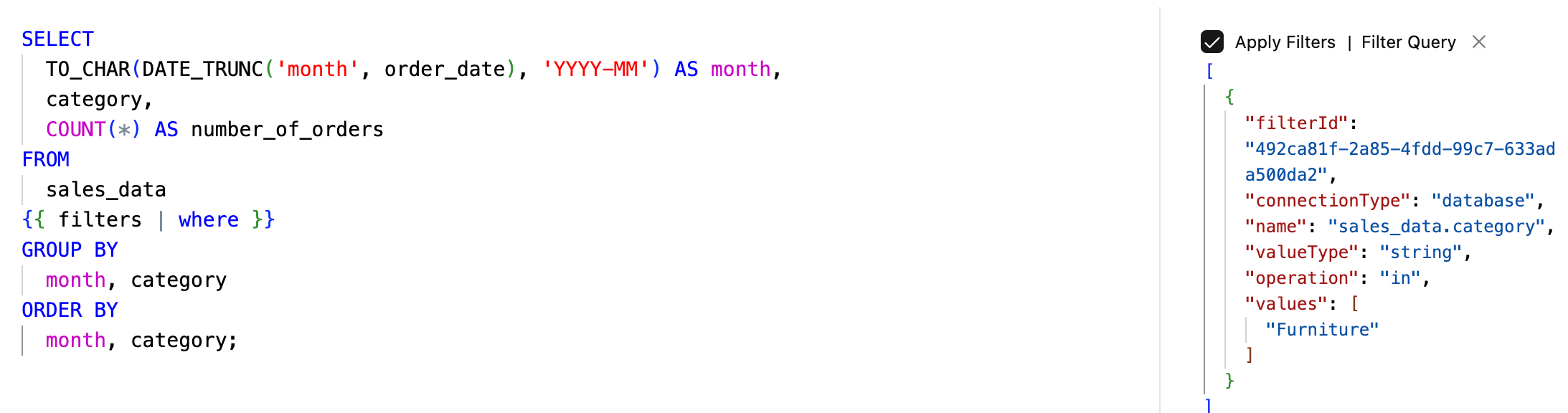
import { useDashboardActions, Dashboard } from 'semaphor';

const { setFilterValues } = useDashboardActions();

const defaultFilterValues: TFilterValue[] = [
  {
    filterId: '492ca81f-2a85-4fdd-99c7-633ada500da2',
    connectionType: 'database',
    name: 'sales_data.category',
    valueType: 'string',
    operation: 'in',
    values: ['Furniture'],
  },
];

<Dashboard
  onFilterValuesChange={handleFilterValuesChange}
  defaultFilterValues={defaultFilterValues}
/>;
onFilterValuesChange fires when viewers change filters. To change filters without reloading the dashboard, call setFilterValues from useDashboardActions.
Default values, onFilterValuesChange, and bookmarks cover every dashboard filter, Document filters included. On a Document sheet, onFilterValuesChange reports the filters in its input bar.
SQL authoring best practices
Three habits keep filtered SQL cards reliable, tenant-safe, and easy to maintain.
1. Use Fully Qualified Table Names
Referencing tables without specifying the schema can lead to ambiguity. In multi-schema environments, the database might resolve table names unexpectedly, causing errors or unintended behavior.
🚫 Example of an ambiguous query
SELECT * FROM users;Even though this query is functionally correct, and speeds up ad-hoc analysis, but may not be ideal if the card subscribes to dashboard filters.
⚠️ Issues with this approach
- In multi-schema environments, it's unclear which schema the users table belongs to.
- Semaphor may not be able to resolve the correct tenant table for multi-tenant dashboards.
✅ Better
SELECT * FROM my_schema.users;Why This Matters:
- Prevents ambiguity. Ensures the correct table is referenced.
- Supports multi-tenancy. Avoids issues with schema-based data separation.
- Improves maintainability. Makes the query more readable and predictable.
- Optimizes performance. Helps Semaphor's query parser work more efficiently.
2. Use Table Aliases
When no alias is used, Semaphor applies the fully qualified column name in the WHERE clause. While this works for most databases, some, like BigQuery, do not allow fully qualified column names in WHERE conditions.
🚫 Without Table Alias
SELECT order_id, product_name FROM sales.sales_data {{ filters | where }};If you apply a filter (country = 'US'), Semaphor generates a query with the fully qualified column name sales.sales_data.country = 'US' in the WHERE clause.
SELECT order_id, product_name FROM sales.sales_data
WHERE sales.sales_data.country = 'US';
This works fine for most databases, but some databases, for example like BigQuery will not allow you to use the fully-qualified-column-name in the WHERE clause.
✅ Better (With Alias)
Use table aliases to simplify queries and ensure compatibility across different databases.
SELECT order_id, product_name FROM sales.sales_data AS s {{ filters | where }};Now, when you apply the filter, Semaphor generates a query with the alias s in the WHERE clause s.country = 'US'.
SELECT order_id, product_name FROM sales.sales_data AS s
WHERE s.country = 'US';
Why This Works:
- The alias(s) replaces the fully qualified column name in
WHEREclause, ensuring compatibility across different databases. - Prevents errors in databases that don't support fully qualified column names in
WHEREclause.
3. Use Data Models to Simplify Queries
If you find yourself making the same joins over and over again, you can create a data model that pre-joins the tables you need.
🚫 Example (Complex Query with Repeated Joins)
SELECT * FROM sales.users as u
JOIN sales.orders as o ON u.id = o.user_id
JOIN sales.products as p ON o.product_id = p.id {{ filters | where }};
⚠️ Issues with this approach: The query is long and repetitive. Every time you need similar data, you must rewrite the joins. This leads to complex, repetitive logic that is harder to read and maintain.
✅ Better (Using a CTE for a Data Model)
WITH user_orders AS (
  SELECT * FROM sales.users as u
  JOIN sales.orders as o ON u.id = o.user_id
)
SELECT * FROM user_orders;
Why this is better:
- The user_orders CTE (Common Table Expression) pre-joins the required tables.
- Queries become simpler and easier to maintain.
- The same logic is reusable without repeating joins.
Using Data Models in Semaphor
You can create a data model in the semaphor console. Once created, you can reference the data model under the dm namespace:
SELECT * FROM dm.user_orders {{ filters | where }};Benefits of Data Models:
- Improves efficiency by avoiding redundant joins.
- Enhances maintainability: update the data model once, and all queries using it benefit.
- Enables cleaner SQL, making queries more readable.