Multi-Tenancy (Legacy)
Learn how to use multi-tenancy in Semaphor
Legacy Security Model
This page documents the legacy token-based security model. For new implementations, we recommend Unified Security, which provides admin-managed policies with policy definitions, assignments, and actor-level resolution. Existing integrations using legacy security continue to work without changes.
Overview
Semaphor provides multiple options for securing and segmenting customer data based on tenant isolation. You can implement Connection-Level, Schema-Level, and Row/Column-Level security policies to control user access within your application.
Connection-Level Security
Connection-level security enables strict data isolation by assigning dedicated databases or data sources to each tenant. With connection-level policies, database connection strings and file paths can be dynamically parameterized based on the requesting tenant. This approach eliminates dashboard duplication and ensures secure data access.
How It Works
When a user authenticates into your app, Semaphor generates AuthToken based on the user's tenancy and profile. This token ensures access only to the authorized data.
For Files (Amazon S3)
In Semaphor, you can visualize .csv or .parquet files stored in Amazon S3. To achieve tenant-based isolation, configure a connection policy that dynamically adjusts the file path based on the tenant. A common pattern is folder-based segmentation:
s3://semaphor-private/store/tenant_a/sales.parquet
s3://semaphor-private/store/tenant_b/sales.parquet
...
s3://semaphor-private/store/tenant_n/sales.parquet
You can create a connection policy using a tenant parameter. You can also have more than one parameter in the connection policy.
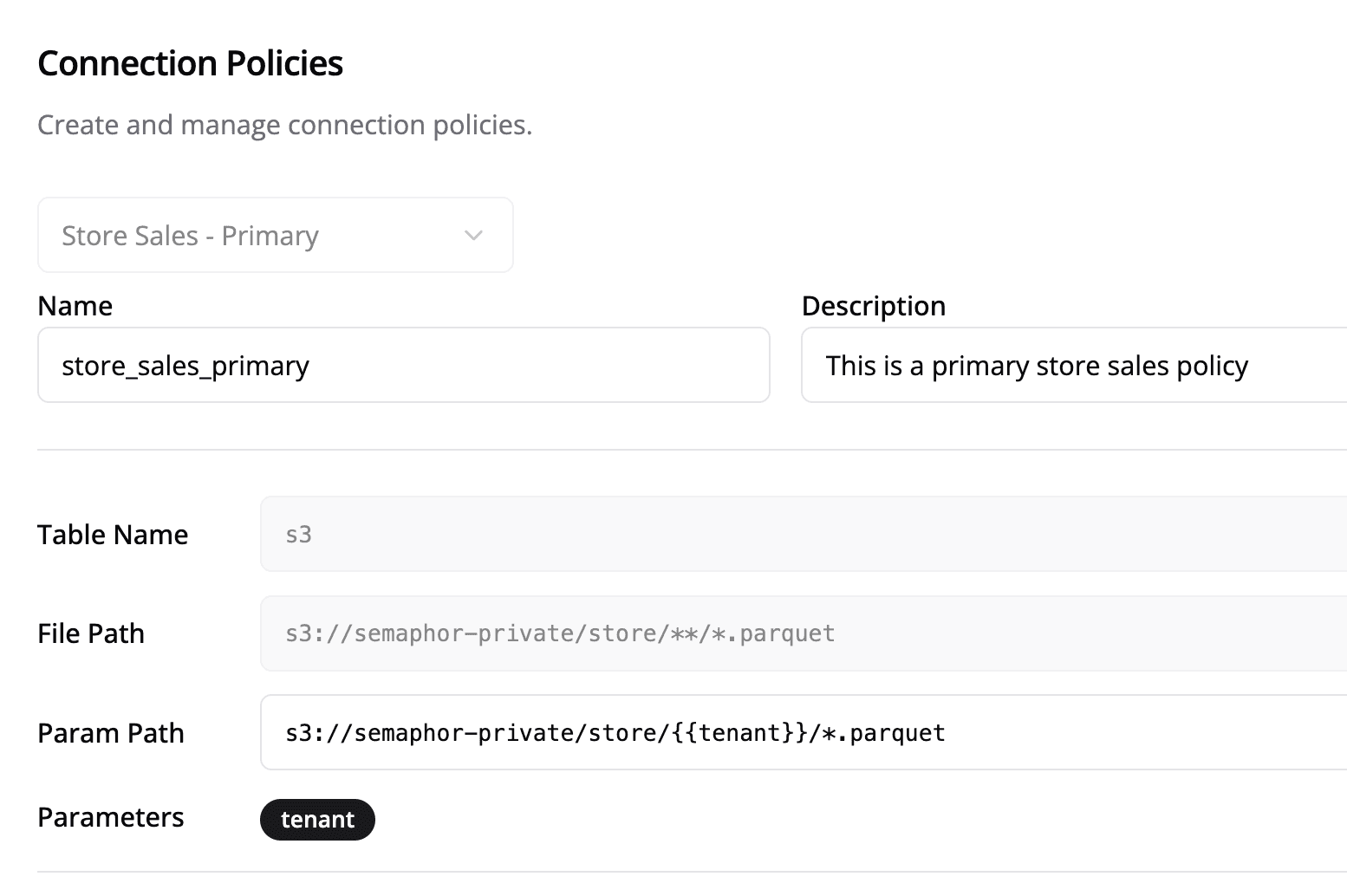
s3://semaphor-private/store/{{ tenant }}/*.parquetFor Databases
Semaphor supports connections to SQL-compatible databases. A common approach for tenant-based isolation is to have separate databases per tenant:
postgresql+psycopg2://username:password@host:port/tenant_a
postgresql+psycopg2://username:password@host:port/tenant_b
...
postgresql+psycopg2://username:password@host:port/tenant_n
The following connection policy parameterizes the database part of the connection string:
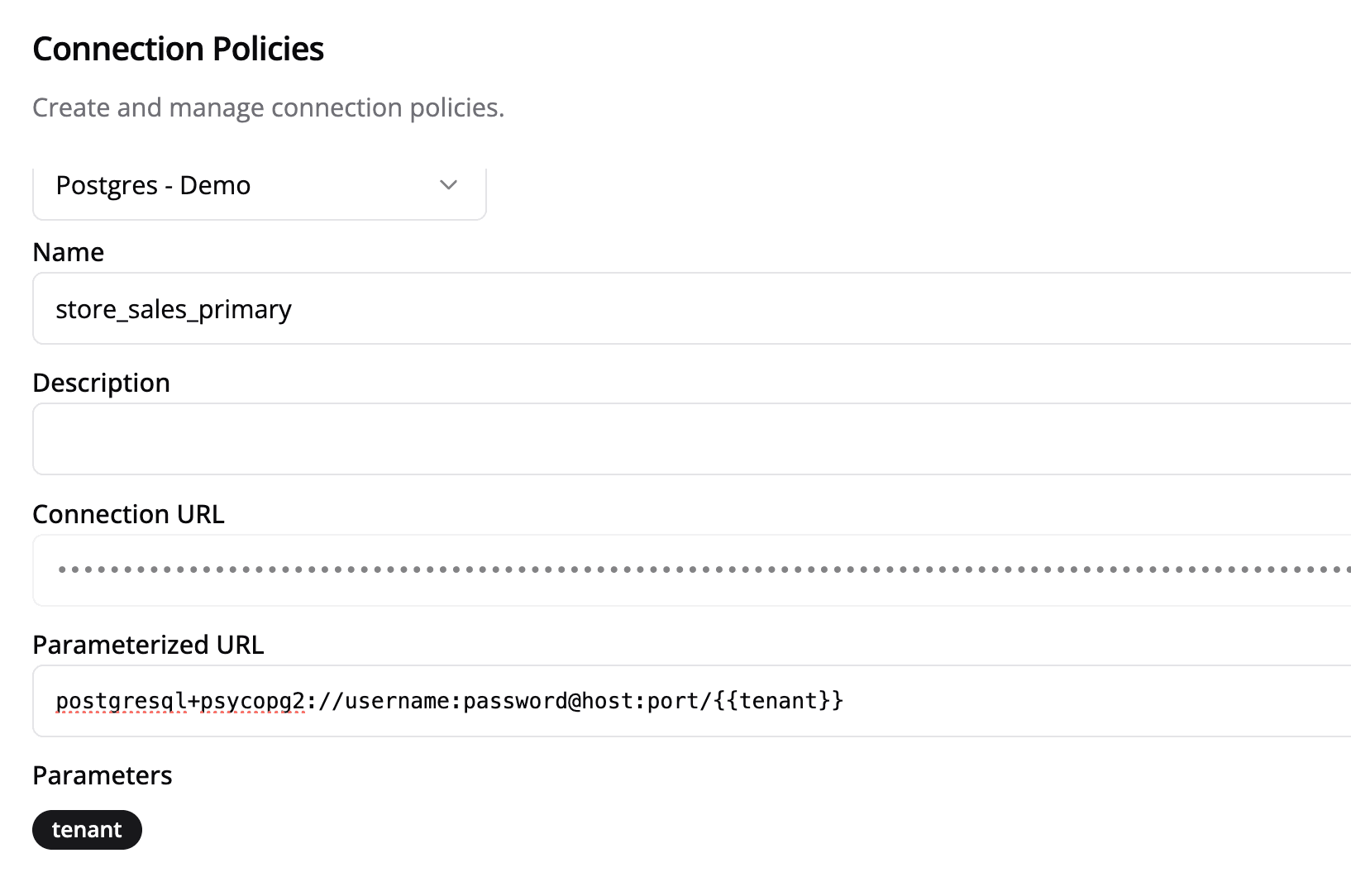
postgresql+psycopg2://username:password@host:port/{{ tenant }}Applying Connection Policies
To apply a connection policy, construct a connection policy object and include it when requesting an authentication token:
const tenant = 'tenant_a';

const connectionPolicy = {
  name: 'store_sales_primary',
  params: {
    tenant: tenant,
  },
};

async function fetchToken() {
  try {
    const response = await fetch(TOKEN_URL, {
      method: 'POST',
      headers: {
        'Content-Type': 'application/json',
      },
      body: JSON.stringify({
        dashboardId: DASHBOARD_ID,
        dashboardSecret: DASHBOARD_SECRET,
        cls: tenant ? [connectionPolicy] : [],
      }),
    });
    if (!response.ok) {
      throw new Error(`HTTP error! status: ${response.status}`);
    }

    const token = await response.json();
    if (token?.accessToken) {
      setAuthToken(token);
      console.log('Token:', token);
    }
  } catch (error) {
    console.error('There was an error!', error);
  }
}

fetchToken();
Security Note
The token generation function must be run on the server side. Do not expose
DASHBOARD_SECRET in client-side code in production.
Schema-Level Security
Schema-level security provides a middle ground between connection-level and row/column-level security by isolating tenant data at the database schema level. This approach allows multiple tenants to share the same database instance while maintaining complete data isolation through dedicated schemas.
How It Works
When a user authenticates into your app, Semaphor uses the sls (Schema Level Security) parameter to automatically route users to their assigned schema. This ensures tenants can only access their designated schema while sharing the same database infrastructure.
Database Schema Structure
In a schema-level security model, each tenant gets their own dedicated database schema:
Database: semaphor_production
├── public (shared tables and internal data)
├── tenant_a (tenant-specific tables)
├── tenant_b (tenant-specific tables)
└── tenant_c (tenant-specific tables)publicschema contains shared tables and internal data for your organization- Each tenant (like
tenant_a,tenant_b, etc.) gets a dedicated schema with tenant-specific tables - Table structures remain consistent across tenant schemas for easier maintenance
Applying Schema-Level Security
To apply schema-level security, include the sls parameter when requesting an authentication token:
const tenantSchema = 'tenant_a';

async function fetchToken() {
  try {
    const response = await fetch(TOKEN_URL, {
      method: 'POST',
      headers: {
        'Content-Type': 'application/json',
      },
      body: JSON.stringify({
        dashboardId: DASHBOARD_ID,
        dashboardSecret: DASHBOARD_SECRET,
        sls: tenantSchema,
      }),
    });
    if (!response.ok) {
      throw new Error(`HTTP error! status: ${response.status}`);
    }

    const token = await response.json();
    if (token?.accessToken) {
      setAuthToken(token);
      console.log('Token:', token);
    }
  } catch (error) {
    console.error('There was an error!', error);
  }
}

fetchToken();
Security Note
The token generation function must be run on the server side. Do not expose
DASHBOARD_SECRET in client-side code in production.
Benefits of Schema-Level Security
- Complete Data Isolation: Each tenant's data is physically separated in different schemas
- Shared Infrastructure: Multiple tenants can share the same database instance
- Consistent Structure: Table schemas remain consistent across tenants for easier maintenance
- Performance: No complex filtering logic required at the application level
- Scalability: Easy to add new tenants without infrastructure changes
Row/Column-Level Security
Row/Column-Level policies provide logical isolation when all customer data resides in a single database table or set of files. These policies function as hard filters, restricting access to specific rows or columns based on the tenant.
How It Works
When a user authenticates, Semaphor applies the defined security policy to the authentication token. This policy restricts access at the row and column level within the dataset.
Example Policy
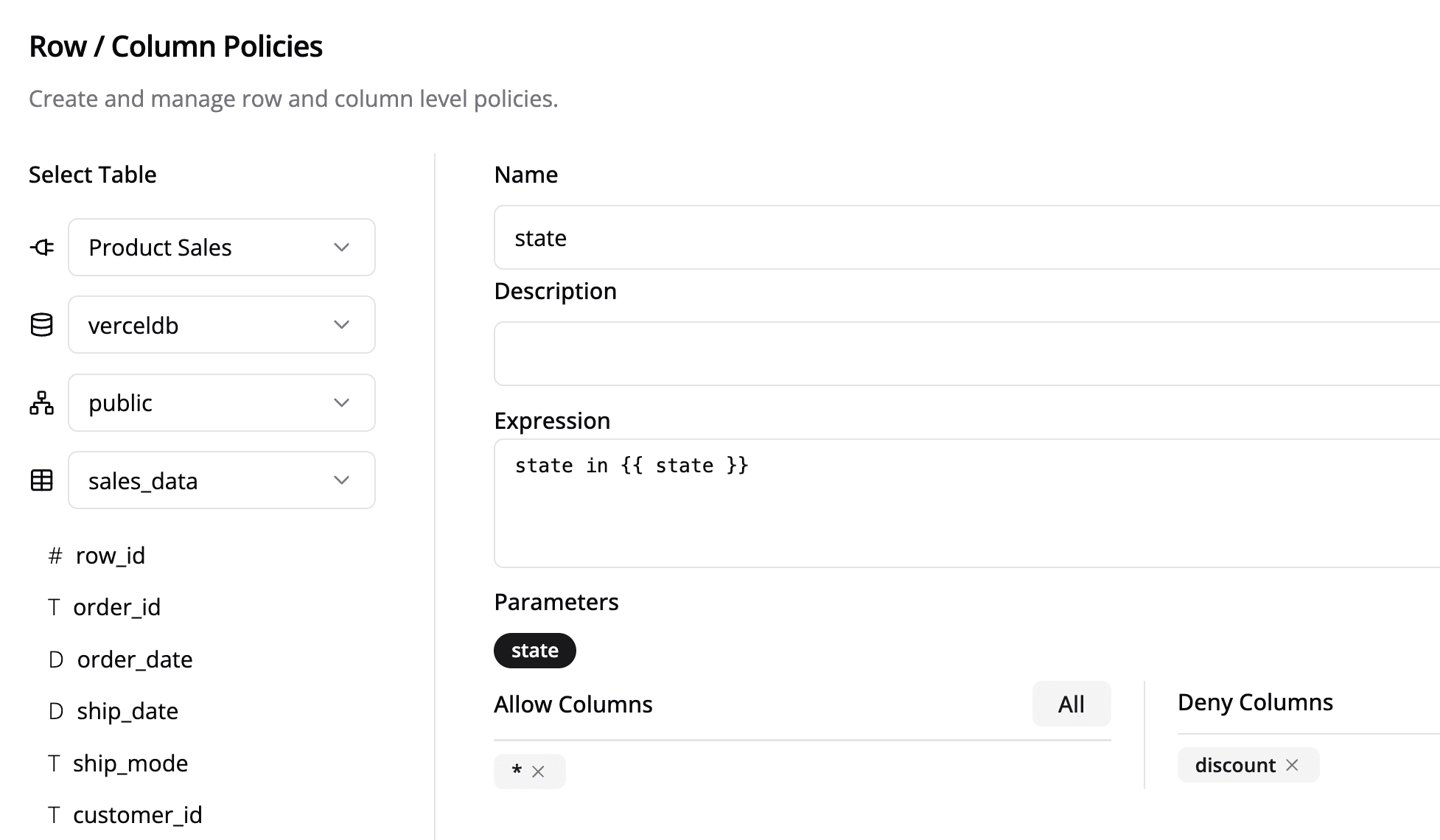
This Row-Level policy filters data based on a state parameter, ensuring users only see data relevant to them. Additionally, specific columns, such as discount, can be restricted from access.
state IN {{ state }}Applying Row/Column-Level Policies
const rowPolicy = {
  name: 'state',
  params: {
    state: ['California', 'Nevada', 'Washington'],
  },
};

async function fetchToken() {
  try {
    const response = await fetch(TOKEN_URL, {
      method: 'POST',
      headers: {
        'Content-Type': 'application/json',
      },
      body: JSON.stringify({
        dashboardId: DASHBOARD_ID,
        dashboardSecret: DASHBOARD_SECRET,
        rcls: rowPolicy,
      }),
    });
    if (!response.ok) {
      throw new Error(`HTTP error! status: ${response.status}`);
    }

    const token = await response.json();
    if (token?.accessToken) {
      setAuthToken(token);
      console.log('Token:', token);
    }
  } catch (error) {
    console.error('There was an error!', error);
  }
}

fetchToken();
Security Note
The token generation function must be run on the server side. Do not expose
DASHBOARD_SECRET in client-side code in production.
Now whenever sales_data table is referenced in the Card SQL, this policy expands into the following SQL expression:
SELECT * FROM sales_data LIMIT 10;SELECT [all columns except `discount`] FROM sales_data
WHERE state IN ('California', 'Nevada', 'Washington') LIMIT 10;Combining Security Policies
You can use connection-level, schema-level, and row/column-level policies together for enhanced security, ensuring comprehensive data isolation and access control. This approach is ideal for multi-tenant architectures requiring flexible security configurations:
- Connection-Level + Schema-Level: Use dedicated databases with schema isolation for maximum security
- Schema-Level + Row/Column-Level: Combine schema isolation with fine-grained access control
- All Three: Implement the most comprehensive security model with physical and logical isolation
By implementing these security measures, you can effectively manage data access while maintaining a secure and scalable multi-tenant environment in Semaphor.